
Category
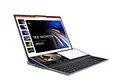
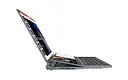


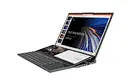
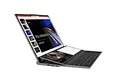

Laptop, high-performance metal, light and thin, online course learning design, business office game, student portable
DJS-LM1614-01
Quantity:
Intel game no
Thin laptop pc
Intel game notebook
tebook
The core feature of a notebook computer is that it integrates a host, a monitor, a keyboard and a mouse. It is highly portable and can meet office and entertainment needs anytime and anywhere, while taking into account certain performance and usage scenario flexibility.
1. Extremely portable and can be used anytime, anywhere
Portability is the core advantage of notebooks, which completely breaks the dependence of desktop computers on fixed space.
The body is thin, light and compact. Most mainstream models weigh 1-2.5 kg and are only 1-2 cm thick. They can be easily put into a computer bag and are convenient to carry around.
The built-in battery supports offline use. There is no need to rely on power when commuting, traveling, or working outdoors. The battery life can generally meet the basic needs of 4-10 hours (depending on the model and usage scenarios).
2. Integrated design, ready to use
Laptops integrate all hardware (CPU, memory, hard drive, screen, keyboard, touchpad) into one, without the need for additional assembly or connection of peripherals, and the threshold for use is extremely low.
No wiring is required after unboxing, just press the power button to start. It is suitable for computer novices or scenarios that need to be put into use quickly (such as temporary meetings, classroom records).
It comes with a keyboard and trackpad, so there is no need to carry an external keyboard and mouse. There is no need to rely on other devices for basic usage scenarios (such as typing and browsing the web).
3. Flexible scene adaptation, taking into account diverse needs
Notebooks with different positions can accurately match various usage scenarios, covering everything from basic office work to high-performance creation and gaming.
Thin and light notebooks: Focus on portability and long battery life, suitable for daily office work, online classes, and light audio and video. It is lightweight and has excellent battery life, making it the first choice for commuters.
Performance laptop/game laptop: Equipped with a high-performance CPU and independent graphics card, it can meet the needs of video editing, 3D modeling, large-scale games, etc., while also taking into account a certain degree of portability, and is suitable for designers or gamers who need to work on the go.
2-in-1 notebook: supports separation of the screen and keyboard or 360° flipping, can be switched to tablet mode, and can be used with a stylus. It is suitable for handwriting notes, drawing and other scenes, and has greater flexibility.
4. Small space occupation and adaptable to limited environments
Compared with desktop computers, laptops require very little space and do not require a dedicated computer desk or additional storage space.
It only requires a small desktop (such as a corner of a desk or a coffee table) to place, making it suitable for rentals, dormitories and other environments with limited space.
There is no need to organize complicated wires, the desktop is cleaner when in use, and storage is more convenient. It can be placed directly in a drawer or cabinet when not in use.
1. Extremely portable and can be used anytime, anywhere
Portability is the core advantage of notebooks, which completely breaks the dependence of desktop computers on fixed space.
The body is thin, light and compact. Most mainstream models weigh 1-2.5 kg and are only 1-2 cm thick. They can be easily put into a computer bag and are convenient to carry around.
The built-in battery supports offline use. There is no need to rely on power when commuting, traveling, or working outdoors. The battery life can generally meet the basic needs of 4-10 hours (depending on the model and usage scenarios).
2. Integrated design, ready to use
Laptops integrate all hardware (CPU, memory, hard drive, screen, keyboard, touchpad) into one, without the need for additional assembly or connection of peripherals, and the threshold for use is extremely low.
No wiring is required after unboxing, just press the power button to start. It is suitable for computer novices or scenarios that need to be put into use quickly (such as temporary meetings, classroom records).
It comes with a keyboard and trackpad, so there is no need to carry an external keyboard and mouse. There is no need to rely on other devices for basic usage scenarios (such as typing and browsing the web).
3. Flexible scene adaptation, taking into account diverse needs
Notebooks with different positions can accurately match various usage scenarios, covering everything from basic office work to high-performance creation and gaming.
Thin and light notebooks: Focus on portability and long battery life, suitable for daily office work, online classes, and light audio and video. It is lightweight and has excellent battery life, making it the first choice for commuters.
Performance laptop/game laptop: Equipped with a high-performance CPU and independent graphics card, it can meet the needs of video editing, 3D modeling, large-scale games, etc., while also taking into account a certain degree of portability, and is suitable for designers or gamers who need to work on the go.
2-in-1 notebook: supports separation of the screen and keyboard or 360° flipping, can be switched to tablet mode, and can be used with a stylus. It is suitable for handwriting notes, drawing and other scenes, and has greater flexibility.
4. Small space occupation and adaptable to limited environments
Compared with desktop computers, laptops require very little space and do not require a dedicated computer desk or additional storage space.
It only requires a small desktop (such as a corner of a desk or a coffee table) to place, making it suitable for rentals, dormitories and other environments with limited space.
There is no need to organize complicated wires, the desktop is cleaner when in use, and storage is more convenient. It can be placed directly in a drawer or cabinet when not in use.
| System Physical Standard Configuration: | ||||||
| Type | Details | Descriptions | ||||
| Product Form | Form Factor | NoteBook | ||||
| Dimensions | 356.8x247.2x28.6mm | |||||
| Weight | 2.5kg | |||||
| LCD | Screen Size | Double screen 16"+14" | ||||
| Screen Resolution | 1920*1200 | |||||
| TP | Touch Module | 14" Ten finger touch screen | ||||
| TouchPad | Touch Pad | 91.6X69mm Touch pad | ||||
| Battery | Type | Lithium-ion polymer battery 11.4V | ||||
| Capacity | 5000mAh 57WH | |||||
| Working Time | 4 hours | |||||
| System Hardware Configuration: | ||||||
| Type | Details | Descriptions | ||||
| CPU | Type | Intel® i7 | ||||
| Speed | 12M Cache,Processor Base Frequency2.70 GHz,Max Turbo Frequency 5.10 GHz | |||||
| GPU | Type | Intel® UHD Graphics for 10th Gen Intel® Processors | ||||
| External graphics card docking station(Optional) | ||||||
| Memory | Capacity | DDR4-2666MHz Two notebook memory sockets, supporting dual channels | ||||
| Storage | Capacity | M.2 2280 B-key SSD M.2 2280 M/B-key SSD | ||||
| Camera | Front | 1.0M | ||||
| Rear | / | |||||
| Microphone | Built-in | Digital microphone | ||||
| Speaker | Built-in | Built-in stereo speakers 8R/1.0W*2 | ||||
| Network Connections: | ||||||
| Type | Details | Descriptions | ||||
| WIFI | WIFI Module | WIFI 802.11ac/b/g/n+BT | ||||
| Wired network | RJ45 | gigabit lan | ||||
| Bluetooth | BT Module | Bluetooth4.2 | ||||
| Interface Configuration: | ||||||
| Type | Details | Descriptions | ||||
| PCI-EXPRESS Slot | External graphics card interface | External graphics card | ||||
| USB Interface | Support Data Transfer | USB3.0*3 USB-C*1 | ||||
| Headphone Jack | Music Output | ∮ 3.5mm standard headphone jack | ||||
| HDMI Interface | Video Output | HDMI*1 | ||||
| Keyboard | Input Device | USB、BT Expuntable Wired / Wireless Supportive | ||||
| Main Accessories: | ||||||
| Type | Details | Descriptions | ||||
| Power adapter | Standard Configuration | DC 19V/3.42A/直流 19V/3.42A | ||||
| Software Configuration | ||||||
| Type | Details | Descriptions | ||||
| Operating System | Android Version | / | ||||
| Windows | Windows 10 | |||||
Recommend Products
 Laptop 15.6inch Office and Business Home Laptop Ultra-thin HD and LightweightLaptopSend Inquiry
 High Quality 8 Inch Laptop Win 10 Intel Core N95 Touch Screen Student Netbook Computer Mini Laptop for Business OfficeDJS-P8 - N100Send Inquiry
 Wholesale 15.6 +7inch dualscreen Notebook PC touchscreen Laptops ssd 1tb Home School Business LaptopDJS-LA15607-N5105Send Inquiry
 Wholesale 8inch Mini Laptop Touch Screen Laptop Rotate 360 Degrees screen notebook computerDJS-P8 N100Send Inquiry
Send Message